ShopDreamUp AI ArtDreamUp
Deviation Actions



Badge Awards
Description
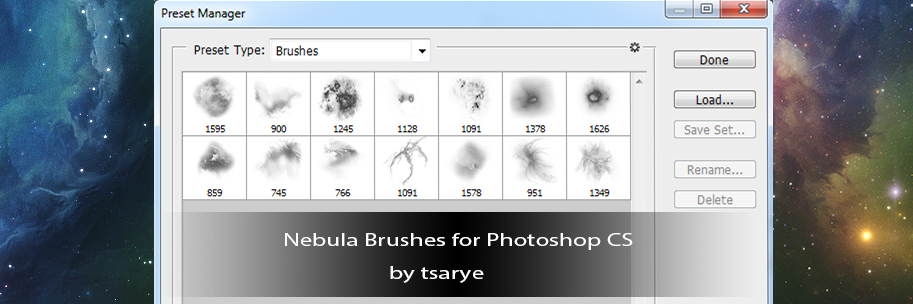
Photoshop CS5 Brushes
Should work in other recent versions of PS. Suited for those new to Space Art.
14 brushes for nebula painting. Several of these are "dirty" by design. This helps in creating the "dust" of a nebula as opposed to sharp edges.
The first 10 brushes were used in the creation of this: [link]
Recommend that you use most of them on a low opacity level (1-5%) with angle and size jitter turned up in the brush attributes settings. Tap out each brush stroke as opposed to just dragging the mouse/pen. This will help in creating unique patterns.
The smudge tool is your FRIEND - use it, a lot. It will aid in blending layers together. Vary your colors, A LOT. This will help in creating volume.
REMEMBER: Using brushes to paint is only utilizing part of their potential. Using them as Erasers (and again fiddling with their attributes and opacity) can yield some awesome results from what would otherwise be a bland brush stroke.
Check out earlier resources:
Resource Pack 1 - Planets: [link]
Resource Pack 2 - Starfields: [link]
Resource Pack 3 - Nebula: [link]
Resource Pack 4 - Nebula Brushes: [link]
Note: You are free to use these both personally and commercially.
Should work in other recent versions of PS. Suited for those new to Space Art.
14 brushes for nebula painting. Several of these are "dirty" by design. This helps in creating the "dust" of a nebula as opposed to sharp edges.
The first 10 brushes were used in the creation of this: [link]
Recommend that you use most of them on a low opacity level (1-5%) with angle and size jitter turned up in the brush attributes settings. Tap out each brush stroke as opposed to just dragging the mouse/pen. This will help in creating unique patterns.
The smudge tool is your FRIEND - use it, a lot. It will aid in blending layers together. Vary your colors, A LOT. This will help in creating volume.
REMEMBER: Using brushes to paint is only utilizing part of their potential. Using them as Erasers (and again fiddling with their attributes and opacity) can yield some awesome results from what would otherwise be a bland brush stroke.
Check out earlier resources:
Resource Pack 1 - Planets: [link]
Resource Pack 2 - Starfields: [link]
Resource Pack 3 - Nebula: [link]
Resource Pack 4 - Nebula Brushes: [link]
Note: You are free to use these both personally and commercially.
© 2012 - 2024 GlennClovis
Comments33
Join the community to add your comment. Already a deviant? Log In
thank you!!!